
Table of Contents
ToggleStreamlining Operations: A Guide to Sage Intacct Supplies Inventory Management
For many organizations, the challenge isn’t selling products—it’s managing the materials used to keep the business running. Whether you are a nursing home managing medical supplies or a construction firm tracking consumables like cleaning agents and contractor bags, managing internal supplies is a critical financial function.
At My ERP Partner, we specialize in guiding mid-market firms toward the right tools. If you need to track stock but don’t “pick, pack, and ship” to customers, Sage Intacct’s specialized Supplies Inventory module might be your perfect fit.
What Exactly is Supplies Inventory Management?
Supplies inventory management involves tracking items that are purchased in bulk and consumed internally as part of normal operations. Unlike traditional inventory, these items are not resold to customers. ### Key Industries that Benefit:
Healthcare & Nursing Homes: Tracking PPE, medical disposables, and linens.
Construction & Restoration: Managing tools, safety gear, and cleaning supplies.
Professional Services: Coordinating high-volume office or maintenance materials.
How Supplies Management Differs from Retail Inventory
Standard inventory modules are built for the supply chain—they focus on shipping logistics and customer fulfillment. Supplies Inventory Management is different because its “customers” are your own employees.
The priority shifts from shipping to:
Requisitioning: Allowing staff to request what they need.
Issuance: Moving stock from the storeroom to the field.
Consumption Tracking: Monitoring how fast supplies are used.
Replenishment: Automated reordering based on set criteria.
Managing Supplies with Sage Intacct: The Supplies Workbench
Sage Intacct offers a dedicated Supplies Inventory module at a reduced price point compared to their full-scale inventory module. This makes it a cost-effective choice for service-based organizations.
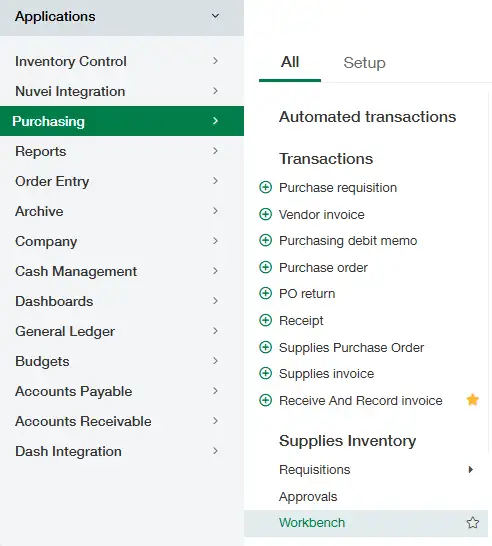
The heart of this system is the Supplies Workbench. Here’s how the workflow functions:
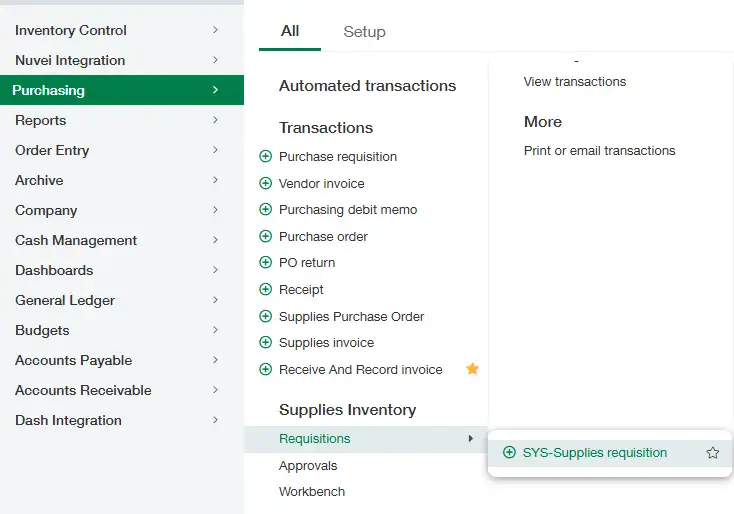
Request: An employee submits a requisition for needed items.
Review: The Inventory Manager sees all requests in the central Workbench.
Action: The manager can either issue the supplies from current on-hand stock or trigger a Purchase Order if stock is low.
Automation: Sage Intacct automatically calculates the cost and reduces the stock levels.
Receipt & Return: The requester is notified to accept the items, and any unused materials can be seamlessly returned to inventory.
Requisition – to request supplies!

Supplies workbench to issue or raise purchase order!

Is Special Setup Required?
Yes. To ensure your accounting and stock levels remain accurate, a specialized configuration is necessary. Our team at My ERP Partner helps you navigate the five pillars of setup:
Supply Item Creation: Defining your unique internal stock.
Document Templates: Configuring advanced templates for internal requisitions.
GL Grouping: Mapping supplies to the correct expense accounts.
Module Integration: Linking the Purchase Order and Inventory modules.
Expert Insight: Because this module is priced lower than the full Inventory version, it offers a high ROI for companies that want sophisticated tracking without the complexity of a retail warehouse.
How My ERP Partner Can Help
We believe your ERP should meet you where you are. As vendor-agnostic specialists in mid-market systems, we don’t just sell software—we find the solution that fits your specific vertical. Whether you are moving from a manual spreadsheet or a legacy on-premise system, we ensure your Sage Intacct environment is built for your unique operational flow.